




What AI Can Do. Agents, OpenClaw, Ollama, and how to deploy AI that actually works in your organisation.
Part 2 of 3 — The AnnariSystems AI Series
In Part 1 we covered the fundamentals, what an LLM is, how tokens work, what models exist, and the difference between cloud and local. If you have not read that yet, start there.
This post is about what happens when you take that brain and give it something to do. Not just chat. Actually do things. Read emails, draft replies, manage files, check calendars, take action in the real world while you sleep.
That is the territory of agents. And to understand agents properly, you need to understand what they are built from.
The Remote Control Problem
OpenClaw is one of the most talked-about AI tools in 2026. It is an agent that runs on your machine, connects to your messaging apps, and takes actions on your behalf. But here is a question that stops most people: if OpenClaw has no brain of its own, how does it know how to open your email?
The answer reveals something important about how all agents are built.
Think of a sophisticated universal remote control. It knows how to send the signal to turn on your TV, change channels, adjust volume. That knowledge is hardcoded into its buttons and circuits by the engineers who built it. The remote does not think. It just executes pre-programmed actions when triggered.
OpenClaw works the same way. Its developer wrote specific code that says: when told to read email, connect to Gmail API and fetch messages. When told to check the calendar, connect to Google Calendar and retrieve events. Those are not decisions. They are pre-written routines.
| Without a brain: OpenClaw is a remote control with nobody pressing the buttons intelligently. With a brain (an LLM): OpenClaw becomes a system that understands what you want and presses the right buttons in the right order. |
What OpenClaw cannot do without an LLM is understand a natural language request like “sort out my week” and figure out on its own that it should check the calendar, read emails, and create reminders. That translation from human intent to action sequence requires the brain.

The Five Layers of an AI Agent
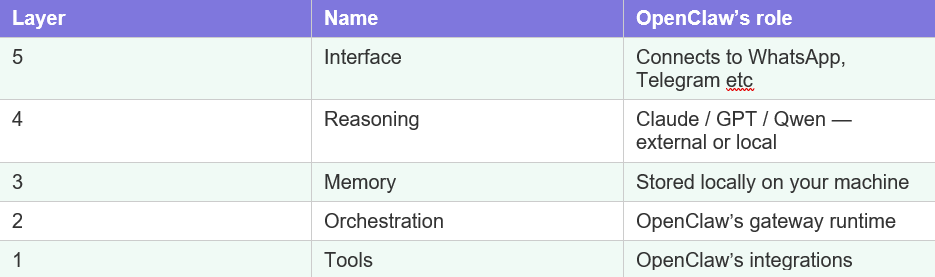
When an AI agent like OpenClaw is running, five distinct layers are at work simultaneously. Each one has a job. Each one depends on the others.
Layer 1 : Tool Layer(the hands)
Pre-written integrations and capabilities: the Gmail connector, the calendar reader, the WhatsApp sender, the file system access, the shell command runner. These are just code modules. They do exactly one thing each and do it reliably. They have zero intelligence. This is what OpenClaw primarily is at its core.
Layer 2 : Orchestration Layer(the nervous system)
This coordinates everything. When the LLM decides “I need to read the emails first, then draft a reply, then send it”, something has to manage that sequence. Call the right tool at the right time. Collect the output. Pass it along. Handle errors. That coordination logic is the orchestration layer. It is the spinal cord connecting the brain to the hands.
Layer 3 : The Memory Layer
Short term memory: what happened earlier in this conversation, what tools were just called. This lives in the LLM’s context window. Long term memory: your name, your preferences, your work patterns. OpenClaw stores this locally on your machine. This is what makes it feel persistent rather than starting from zero every time.
Layer 4 : The Reasoning Layer (the brain)
This is the LLM : Claude, GPT, DeepSeek, or a local Qwen or Llama. It receives your request plus context from memory plus available tool descriptions, and it decides what to do. It is the only layer that actually thinks. Everything else just enables it or executes its decisions
Layer 5 : The Interface Layer (the face)
How you communicate with the whole system: WhatsApp, Telegram, Discord, a web UI. It is just the front door. The intelligence is not here. It receives your message, passes it down, and presents the response back to you.

Ollama ( Waking the Brain Up)
If you want to run the brain locally,on your own machine, privately, with no data leaving your building , you need Ollama.
Here is why. When you download a model from the internet, what you get is literally just a file. A very large file full of numbers ,the weights. That file does absolutely nothing on its own. It just sits on your hard drive.
For anything to use that model, three things need to happen: the file has to be loaded into memory so the processor can work with it, it has to be running as an active process, and it needs an open door,a local API server, so other software can send it messages and get responses back.
A raw model file does none of these things by itself. It is inert.
The analogy: the model file is a brilliant doctor’s entire medical knowledge — but the doctor is unconscious. Ollama is the thing that wakes the doctor up, sits them at a desk, and opens the clinic door so patients can walk in. Without Ollama, the doctor is still unconscious on the floor. All the knowledge is there,completely unreachable.
Ollama does all three automatically the moment you run it. It loads the model, keeps it running, and opens a local API at http://localhost:11434 that anything on your machine can talk to.
To get started: install Ollama from ollama.com, then in your terminal type “ollama pull qwen2.5” to download Qwen, and “ollama run qwen2.5” to start talking to it. No internet required after the download. No subscription. No usage limits.
Cloud vs Local : The Two Setups
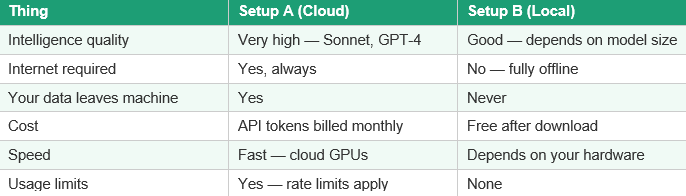
OpenClaw just needs an LLM endpoint to talk to — a URL where it can send messages and get responses back. That endpoint can be cloud or local. Here is what each actually looks like in practice.
Setup A : OpenClaw + Cloud LLM
OpenClaw runs locally on your machine. When you send a message, it packages your request and sends it over the internet to Anthropic’s or OpenAI’s servers. The LLM thinks there, sends the response back, OpenClaw acts on it.
Setup B : OpenClaw + Ollama + Local LLM
Everything runs on your machine. OpenClaw sends your message to Ollama’s local API. Ollama passes it to the local model, gets the response, returns it to OpenClaw. Zero internet involvement after initial setup.
The problems with each alone
Setup A only:
- Every conversation, every email it reads, every file it touches travels to Anthropic or OpenAI’s servers. For sensitive client data, that is a hard no.
- An always-on agent checking your email every hour burns tokens continuously. The bill can surprise you.
- If your internet drops , and in Ghana that happens , the whole agent goes dead. The brain is unreachable.
Setup B only:
- A 7B local model will struggle with complex reasoning and nuanced writing where Sonnet would handle it easily.
- Running Ollama permanently alongside OpenClaw consumes RAM and CPU. On a modest machine this adds up.
- Local models have a knowledge cutoff and no web search unless you specifically add that capability.
| The ideal setup: a hybrid. Cloud LLM for tasks that need strong reasoning and carry no sensitive data. Local LLM for anything touching confidential client information. OpenClaw supports switching between LLM backends,so you can route different tasks differently. This is the conversation most IT consultancies in Ghana are not having with clients yet. |
The Three Components You Need
To deploy a working AI agent for your organisation, three things must work together and none of them can be removed.
- The brain : a local model (Qwen, Llama) or cloud model (Claude, GPT). The LLM. Does the thinking. Without it everything else is empty machinery.
- The runner : Ollama (for local). Loads the model, keeps it running, opens the API door. Without this the brain is unconscious on the floor.
- The body : OpenClaw or equivalent agent framework. The orchestration, the tools, the memory, the interface. Without this the brain has no hands.
| Remove any one: • Brain without runner = unreachable • Runner without body = nowhere to act • Body without brain = capable hands, no instructions All three required. All three working together = a deployable AI agent. |
Ready to explore what AI can do for your organisation?
Contact AnnariSystems today. Whether you want to understand your options, run a private local AI demo, or just have an honest conversation about what is realistic for your sector , we are the right starting point.
📧 Email: info@annarisystems.com
💬 WhatsApp: +233 (545) 702-789
📍 AnnariSystems — practical AI for Global businesses, on your terms..